Screen Time Rules for Kids: Simple Checklist That Works
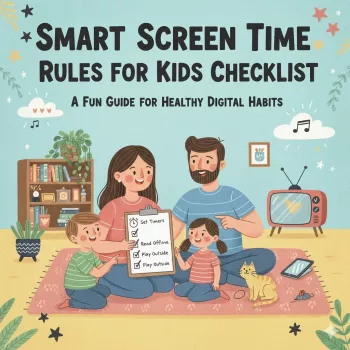
Smart Screen Time Rules for Kids: A Practical Checklist for Healthier Tech Habits
Clear, consistent screen time rules reduce daily negotiations, protect sleep and focus, and help kids build healthier relationships with devices. A simple, family-friendly system works best: agree on goals, set a few non-negotiables, define what “counts” as screen time, and use a posted checklist so everyone knows what to expect—without turning tech into a constant battle.
Start With a Family Tech Agreement (Not a List of Punishments)
The fastest way to reduce power struggles is to start with shared goals instead of threats. Pick 2–3 “why” goals that matter to your household—better sleep, smoother homework time, fewer mood swings, kinder online behavior, more outdoor play—and write them at the top of your plan.
- Write rules as positive actions when possible (for example, “screens after homework” instead of “no screens”).
- Involve kids in choosing options for free time so the plan feels fair, not forced.
- Decide what adults will do too (phones charging outside bedrooms, no scrolling during meals).
- Set a review date—weekly for the first month, then monthly—so rules can evolve without “renegotiating” every day.
If you’d rather not build the whole system from scratch, a ready-to-post option can help: Printable Smart Screen Time Rules for Kids Checklist.
Non‑Negotiable Rules That Protect Sleep, School, and Safety
Some boundaries are worth making universal because they protect health and learning. The goal is to remove debate by making these rules steady—even on good days.
- Device-free sleep: create a household charging spot outside bedrooms, plus a consistent “screens off” buffer before bedtime. (The CDC’s sleep guidance reinforces how important consistent sleep routines are for kids and teens.)
- Responsibilities first: define what must be done before entertainment (homework, reading, practice, pet care, chores).
- Mealtime boundaries: choose specific meals that are always device-free—many families start with dinner.
- Privacy and safety basics: no sharing full name, school, address, or live location; younger kids confirm friend requests with a parent.
- Respect rule: no devices used to tease, exclude, or screenshot/share others without permission.
For extra structure, the American Academy of Pediatrics Family Media Plan is a helpful companion for aligning boundaries with your child’s age and needs.
Define What Counts as Screen Time (So Rules Feel Consistent)
Many “screen time fights” are actually “definition fights.” When kids feel the rules change depending on a parent’s mood, they push back harder. Make categories and decide the gray areas in advance.
- Separate learning screens (homework, school portals, reading apps) from entertainment screens (videos, games, social).
- Agree on gray areas: video chatting with family, listening to music on a screen, background TV, educational YouTube.
- Decide whether shared family movies count the same as solo scrolling.
- Use a simple traffic-light system: Green (learning/creative), Yellow (relaxing), Red (endless scroll/age-inappropriate).
- Write down exceptions (travel days, sick days, family movie night) so they don’t become daily loopholes.
If you want an outside perspective on what tends to be more beneficial vs. more draining, Common Sense Media’s screen time resources can help you weigh apps and content.
Age‑Appropriate Expectations: Build Skills, Then Expand Freedom
The most workable approach is “more freedom follows more skill.” Screen rules aren’t only about minutes; they’re about building judgment, honesty, and emotional regulation.
Start with tighter structure in shared spaces and expand independence after routines become consistent. Focus on skill-building: spotting ads, noticing manipulative design (autoplay, streaks), handling group chats, and asking for help quickly when something feels off.
Quick guide: common rule ideas by age
| Age range | Typical rules that work well | Parenting focus |
|---|---|---|
| 2–5 | Short sessions; only with an adult nearby; no autoplay; devices off at meals/bedtime | Routine, co-viewing, simple choices |
| 6–9 | Screens after responsibilities; devices stay in shared spaces; approved apps only | Consistency, self-regulation basics |
| 10–12 | Clear gaming/video windows; limited social features; tech-free bedtime; check-ins | Online safety, peer pressure prep |
| 13–17 | Agreed curfew; school-night limits; privacy with accountability; consequences for rule-breaking | Digital citizenship, balanced independence |
Use a Checklist System: Simple Rules, Visible Reminders, Predictable Consequences
It also helps to stock your home with easy off-screen “defaults” so screens aren’t the only fun option. For example, a hands-on toy that invites tinkering can create a natural transition away from devices, like the 1:20 RC Drift Truck 2WD Off-Road Crawler with Lights.
Make It Stick: Routines That Reduce Negotiation
Small practical supports can make routines smoother—especially for younger kids. Keeping a “grab-and-go” outfit ready can reduce morning screen temptation and stalling, such as the Baby Girl Autumn Plaid Bow Dress with Headband 0-18 Months.
Printable Family Tech Rules eBook: A Ready-to-Use Checklist
For a ready-to-use option, see the Smart Screen Time Rules for Kids Checklist | Digital Parenting Guide | Printable Family Tech Rules eBook for Healthy Screen Time.
FAQ
What are reasonable screen time rules for kids on school nights?
Prioritize sleep-first routines, keep devices charging outside bedrooms, and set a consistent cutoff time. Require homework and responsibilities before entertainment, and use a short, predictable leisure window that matches your child’s age and workload.
How can screen time rules work without daily arguments?
Use fewer rules with clear if/then logic, post them where everyone can see them, and rely on timers with transition warnings. Apply consistent, proportionate consequences and save adjustments for a calm weekly check-in instead of negotiating every day.
Should educational screen time count the same as gaming or videos?
Separating learning/creative use from entertainment usually feels more fair and reduces conflict. Define gray areas ahead of time, then track real outcomes—sleep, mood, school performance—rather than treating every minute identically.









Leave a comment